Restore Old Photos with AI
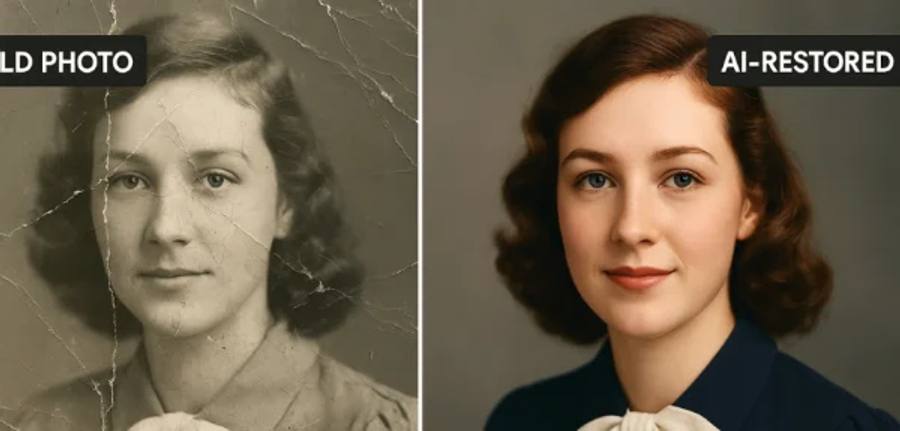
Faded wedding photos, scratched childhood prints, stained family portraits — describe the damage and watch AI repair it in seconds.
Restore a Photo Free
Preview 3 edits free, no sign-up. Downloads require a paid plan or a $4.99 pack with 5 extra edits. No subscription needed for a pack.
How it works
Snap a straight, glare-free phone photo of the print (or scan it) and upload it. Type a prompt like “remove scratches and dust, restore faded colors.” The AI repairs damage, balances fading, and sharpens details.
Example prompts
- “Remove scratches and dust spots”
- “Restore faded colors to look new”
- “Fix this stain in the corner”
- “Sharpen this blurry old photo”
- “Repair the torn edge of this photo”
- “Restore this black and white portrait”
Perfect for
- Family albums — grandparents' wedding, childhood photos
- Genealogy projects and ancestry records
- Framing restored prints as gifts
- Memorial and tribute collections
- Digitizing shoeboxes of prints before they fade further
Why xmorf for restoration?
- Free to try — 3 edits per month, no sign-up
- No complex software — just describe the damage
- A whole album to restore? Pro ($44.99/mo) covers 100 edits a month, Ultra ($149.99/mo) is unlimited
Free to try · No sign-up · No credit card